
An Arduino buzzer circuit is useful for adding audible alerts, status indicators, and sound effects to electronics projects. Connecting a buzzer to an Arduino is straightforward when you use the right type of buzzer and ensure that its operating voltage and current requirements are compatible with the board. This tutorial explains how to connect an active buzzer directly to an Arduino Uno and how to use an NPN transistor when the buzzer requires a different supply voltage or draws more current than an Arduino output pin can safely provide.
How to Connect an Arduino Buzzer
You can connect an active buzzer directly to an Arduino Uno if the buzzer operates at the board’s output voltage and draws a suitably low current. If the buzzer requires a higher voltage, such as 9V or 12V, or draws too much current for an Arduino output pin, use an NPN transistor as a switch to connect the buzzer to the Arduino pin.
There are two main ways to connect a buzzer and Arduino:
- Direct connection: Connect a low-current, 5V-compatible active buzzer between an Arduino digital output pin and GND.
- Transistor interface: Use an NPN transistor to switch the buzzer’s power supply independently of the Arduino’s output voltage.
The best method depends on the buzzer’s specifications. Check its rated operating voltage and current consumption before connecting it to the board.
An active buzzer contains an internal oscillator or driving circuit that generates a tone when power is applied. This makes it particularly convenient for beginners because the Arduino does not need to generate the audio frequency itself. The program or sketch simply switches the buzzer on and off.
Connecting an Active Buzzer Directly to an Arduino Uno
A low-current active buzzer can be connected directly to an Arduino Uno if its electrical specifications are suitable for the board. This is the simplest Arduino buzzer circuit because it requires no additional transistors or driver components.
The example in this section uses an active piezo buzzer that operates from 3V to 28V. It draws approximately 4mA at 12V and was measured to draw about 1.1mA at 5V. At that measured current, the buzzer is suitable for direct operation from an Arduino output pin, provided the particular buzzer and board specifications permit it.
Do not assume that every buzzer can be connected directly to an Arduino. Some active buzzers draw considerably more current, while others require a supply voltage higher than the Arduino’s logic voltage.
Arduino Buzzer Circuit Diagram for Direct Connection
The circuit is simple. Connect the positive terminal of the active buzzer to digital pin 13 of the Arduino Uno and connect its negative terminal to GND.
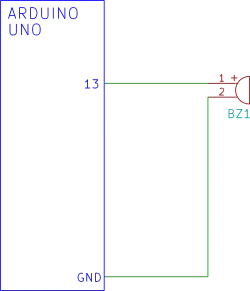
The circuit uses the Arduino’s output pin to switch the buzzer on and off. When pin 13 is HIGH, the pin supplies a voltage close to 5V relative to GND. When the pin is LOW, its output voltage is close to 0V, so the buzzer switches off.
Although this circuit uses pin 13, another suitable digital output pin can be used by changing the pin number in the sketch.
Arduino Buzzer Sketch for Direct Connection
The Arduino IDE includes a built-in Blink example that can be used to test the circuit. Open the Arduino IDE and select File → Examples → 01.Basics → Blink.
The Blink sketch repeatedly switches the selected output pin HIGH and LOW. If the active buzzer is connected to pin 13, it will sound while the pin is HIGH and stop when the pin is LOW.
Alternatively use the following sketch as a simple test that switches the buzzer on for one second and off for one second.
const int buzzerPin = 13;

void setup() {
  pinMode(buzzerPin, OUTPUT);
}

void loop() {
  digitalWrite(buzzerPin, HIGH);
  delay(1000);

  digitalWrite(buzzerPin, LOW);
  delay(1000);
}Upload the sketch to the Arduino Uno. The buzzer should sound for one second, remain silent for one second, and repeat continuously.
The digitalWrite() function controls the output state, while delay() determines how long the program waits between switching the buzzer on and off.
The following video shows the direct connection buzzer circuit operating.
Which Active Buzzer Can Be Connected Directly?
The example buzzer used in the original circuit was a Kingstate KPEG260. It is an active piezo buzzer with internal circuitry that generates the sound.
When selecting a replacement, check the manufacturer’s datasheet for:
- Operating voltage: The buzzer must operate correctly at the voltage available from the Arduino output.
- Operating current: The current must remain within the safe output limits of the Arduino pin.
- Polarity: A polarized buzzer must be connected with the correct positive and negative terminals.
- Buzzer type: An active buzzer produces a tone when powered, while a passive piezo element generally requires an alternating or pulsed drive signal.
The buzzer’s maximum rated voltage alone does not establish whether it can be driven directly. Its current consumption at the intended operating voltage is equally important.
If the buzzer draws too much current or requires a higher supply voltage, use the transistor circuit described next.
Arduino Buzzer Circuit Using an NPN Transistor
An NPN transistor provides a simple way to interface an Arduino with a buzzer that requires a different supply voltage or more current than a digital output pin can provide.
For example, an Arduino Uno operates with 5V logic, but an active buzzer may require 9V or 12V. Connecting that higher voltage directly to an Arduino output pin could damage the board. Instead, the transistor switches the buzzer’s supply current while the Arduino provides only a control signal.
The same approach works with a 5V buzzer that draws more current than the Arduino pin can safely supply.
A typical circuit uses:
- An Arduino Uno or compatible board.
- An active buzzer rated for the external supply voltage.
- An NPN transistor, such as a PN2222, with suitable current and power ratings.
- A base resistor to limit current flowing into the transistor’s base.
- An external DC power supply for the buzzer, if required.
- Connecting wires and a common ground connection.
Arduino Buzzer Transistor Circuit Diagram
The circuit uses the NPN transistor as a low-side switch. The buzzer connects between the positive supply and the transistor’s collector. The transistor’s emitter connects to GND, and the Arduino output connects to the base through a resistor. The following circuit diagram shows the circuit with the buzzer powered by an external battery.
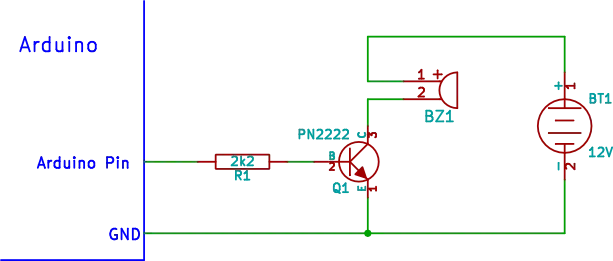
An equivalent circuit to the one above is shown below. This circuit shows 12V as the voltage supply to the buzzer circuit, but not specifically from a battery. The 12V power point in this circuit represents any 12V supply such as a mains powered DC 12V supply. On the other hand it could also be powered from a 12V battery. Although the circuit shows 12V, any other low voltage DC power supply that the buzzer is rated to operate at could be used. For example a 9V power supply. Bear in mind that the Arduino board must still be powered from its own power supply in either of these circuits. In addition in the circuit below, the Arduino GND pin must still be connected to the transistor emitter, which is shown connected to a GND symbol.
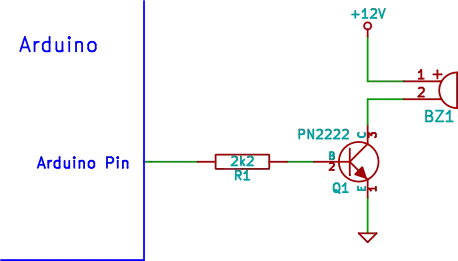
In this arrangement, the transistor acts as an electronically controlled switch that works as follows.
When the Arduino output goes HIGH, current flows through the base resistor into the transistor’s base. The transistor turns on, allowing current to flow from the buzzer’s positive supply, through the buzzer and transistor, to GND. The buzzer sounds.
When the Arduino output goes LOW, the transistor switches off. The current through the buzzer stops, and the buzzer becomes silent.
The transistor separates the Arduino’s output pin from the buzzer’s load current. However, it does not eliminate the need to choose suitable components or connect the circuit correctly.
Connecting the Arduino Buzzer Circuit
For the common-emitter, low-side switching circuit described above, make the following connections.
| Component or Terminal | Connection |
|---|---|
| Buzzer positive terminal | Positive terminal of the buzzer’s rated DC supply |
| Buzzer negative terminal | Transistor collector |
| Transistor emitter | GND |
| Arduino digital output pin | Transistor base through the base resistor |
| Arduino GND | Negative terminal of the external power supply |
| External supply positive terminal | Buzzer positive terminal |
The Arduino and external supply must share a common ground so that the transistor’s base signal has a defined reference voltage.
For example, if a 12V supply powers the buzzer, connect the 12V supply’s negative terminal to Arduino GND. Do not connect the 12V positive terminal to an Arduino digital output pin.
The transistor’s pinout varies between part numbers and manufacturers. Check the datasheet for the specific transistor before wiring it. Transistors that look identical may have different collector, base, and emitter arrangements.
Choosing an NPN Transistor for a Buzzer
The transistor must be able to handle the buzzer’s current and the voltage across it when switched off. A PN2222 is one possible choice for a small buzzer, provided its ratings are suitable for the application. A typical PN2222 part could be the PN2222A, or a similar part like the KSP2222A.
In the original example, a PN2222 and a 2.2kΩ base resistor were used for buzzers drawing up to approximately 200mA. A PN2222A or KSP2222A are rated with absolute maximum collector currents of 600mA, so 200mA is well within safe operating limits.
When selecting a transistor, consider:
- Collector current: The transistor must handle the buzzer’s operating and startup current.
- Collector-emitter voltage: The transistor must withstand the buzzer supply voltage with an appropriate safety margin.
- Power dissipation: Check that the transistor will not overheat during operation.
- Base current: The Arduino output and base resistor must provide enough base current to switch the transistor fully on.
- Pinout: Verify the connections using the manufacturer’s datasheet.
The transistor should operate in saturation when switched on so that its voltage drop is low. The base resistor helps limit the current supplied by the Arduino output.
A 2.2kΩ resistor is a useful starting point for the original PN2222 example, but the correct value depends on the transistor, buzzer current, and Arduino output characteristics.
If the buzzer’s current demand is too high for a small transistor, choose a more suitable transistor or a logic-level MOSFET designed for the required load.
Powering the Buzzer Circuit from 9V or 12V
The transistor circuit allows the buzzer and Arduino to use different supply voltages. For example, the Arduino Uno can be powered through USB while a 9V battery or a suitable 12V DC supply powers the buzzer.
The important requirement is that the buzzer’s supply voltage must match its rated operating range and that the supply can deliver enough current.
The original circuit was designed to accommodate suitable buzzers operating from approximately 5V to 24V. This range is not universal for all transistor circuits or buzzers. Check the ratings of the buzzer, transistor, and other components before applying power.
A small rectangular 9V battery may also perform poorly with a buzzer that draws substantial current. If the buzzer is unreliable or the battery voltage drops significantly, use a supply better suited to the load.
Arduino Buzzer Sketch Using a Transistor
The Arduino sketch below for the transistor circuit is similar to the direct-connection sketch. The difference is that the output pin controls the transistor rather than supplying the buzzer’s operating current directly.
The following sketch switches the buzzer on for 100 milliseconds, then off for one second. It repeats this pattern continuously. In addition, the sketch is configured for the buzzer transistor circuit connected to Arduino digital pin 3.
const int buzzerPin = 3;

void setup() {
  pinMode(buzzerPin, OUTPUT);
}

void loop() {
  digitalWrite(buzzerPin, HIGH);
  delay(100);

  digitalWrite(buzzerPin, LOW);
  delay(1000);
}Connect the transistor’s base resistor to digital pin 3, as specified in the sketch.
When pin 3 goes HIGH, the transistor switches on and powers the buzzer. When pin 3 goes LOW, the transistor switches off and the buzzer stops sounding.
The sketch does not need to know whether the buzzer is powered from 5V, 9V, or 12V. The Arduino supplies the control signal, while the external power supply provides the load current. This separation makes the circuit useful when the buzzer’s electrical requirements exceed the capabilities of a direct Arduino connection.
The following video demonstrates the transistor buzzer interface circuit with the above sketch in action.
Active Buzzer Arduino Interfacing: Active vs. Passive Buzzers
Choosing the correct buzzer type is important when designing an Arduino sound circuit. Active and passive buzzers can look similar, but they operate differently.
| Feature | Active Buzzer | Passive Piezo Element |
|---|---|---|
| Internal oscillator | Usually included | Not included |
| Sound generation | Produces a tone when powered | Requires an alternating or pulsed drive signal |
| Basic Arduino control | Switch the buzzer on and off | Generate a suitable waveform or use a tone function |
| Typical applications | Alarms, beeps, and status alerts | Variable tones, melodies, and sound effects |
| Additional circuitry | May need a transistor for higher current or voltage | Drive requirements depend on the element and circuit |
An active buzzer is generally the easier choice for a beginner who wants a simple audible indicator. The Arduino can switch it on and off without generating the audio frequency.
A passive piezo element is more flexible when you want to generate different tones. For example, Arduino’s tone() function can generate a square-wave signal at a specified frequency. The appropriate drive circuit depends on the piezo element’s electrical characteristics.
Do not assume that a bare piezo disk can be substituted directly for an active buzzer and produce the same result with the same sketch.
Common Arduino Buzzer Problems and Solutions
If your Arduino buzzer circuit does not work as expected, check the following points before replacing components.
| Problem | Possible Cause | Solution |
|---|---|---|
| Buzzer does not sound | 1) Incorrect polarity or wiring 2) Possibly it is a passive piezo element, not an active buzzer | 1) Check the positive and negative terminals and verify the circuit connections. 2) Check the buzzer directly across its rated power supply to see if it sounds. |
| Buzzer works intermittently | Supply voltage drops under load | Check the supply voltage and current capacity. |
| Arduino resets when the buzzer switches on | Excessive load current or supply disturbance | Use a transistor driver and a suitable power supply. |
| Buzzer is very quiet | Incorrect operating voltage or unsuitable buzzer | Check the datasheet and use the specified supply voltage. |
| Transistor becomes hot | Excessive current or inadequate switching | Check the transistor ratings and base drive, and select a suitable driver. |
| Arduino pin gets hot or stops working | Excessive current or an incorrect connection | Disconnect the circuit and inspect the wiring. Never exceed the pin’s current limits. |
| Buzzer remains on continuously | Incorrect pin configuration or program logic | Check the selected pin, sketch, and transistor connections. |
If you are using the transistor circuit, confirm that the Arduino GND and external power supply negative terminal are connected together. A missing common ground is a frequent cause of unreliable transistor switching.
Also check whether the Arduino pin is the same as the pin specified in the sketch. If the circuit uses pin 3 but the sketch controls pin 13, the buzzer will not respond as expected.
Tips for Arduino Buzzer Circuits
Use these practical tips when building an Arduino buzzer project.
- Check the datasheet first. Confirm the buzzer’s rated voltage, current consumption, and polarity before connecting it.
- Use direct drive only when appropriate. A buzzer that works at 5V is not automatically suitable for direct connection to an Arduino output pin. Its current consumption must also be within the pin’s safe operating limits.
- Use a transistor for higher-current loads. A transistor prevents the Arduino output pin from having to supply the buzzer’s full operating current.
- Keep the grounds connected. When using a separate supply, connect its negative terminal to Arduino GND so that the transistor control signal has a common reference.
- Check the transistor pinout. Use the datasheet for the exact component rather than relying on the physical appearance of the package.
- Choose a suitable power supply. The supply must provide the required voltage and enough current for the buzzer.
- Test with a simple sketch. Start by switching the buzzer on and off at a slow rate before adding more complicated program logic.
- Use the correct buzzer type. An active buzzer is convenient for simple beeps, while a passive piezo element is better suited to projects that need different audio frequencies.
- Disconnect power before rewiring. This reduces the risk of accidental short circuits and component damage.
One particularly useful shortcut is to test the Arduino code and wiring separately. First, confirm that the output pin changes state as expected. Then check the buzzer supply and transistor connections. This makes it easier to identify whether a problem lies in the program, the circuit, or the power supply.
Did You Know?
Active buzzers are useful because they contain the circuitry needed to generate a tone. Unlike a bare piezoelectric element, an active buzzer does not normally need the Arduino to generate a specific audio frequency.
This makes active buzzers popular in beginner projects, including:
- Low-battery warnings.
- Door-open alarms.
- Temperature threshold alerts.
- Sensor status indicators.
- Timers and countdown devices.
- Audible feedback for buttons and switches.
A buzzer can also provide useful feedback when a project has no display. For example, a microcontroller can produce a short beep when a measurement is complete or a sensor detects a particular condition.
Another useful detail is that the Arduino does not have to power the buzzer directly to control it. With a suitable transistor interface, the Arduino can control a buzzer powered from a separate supply. This is a general electronics technique that can also be used to switch other loads, provided the switching component and circuit are designed for the load.
Frequently Asked Questions
Can you connect a buzzer directly to an Arduino?
Yes, provided the buzzer operates at a suitable voltage and draws a current that the Arduino output pin can safely supply. This is usually a maximum of 20mA for an Arduino Uno, but depends on how much current is being drawn out of other pins at the same time. See the Arduino Uno Hardware Manual for details. A low-current active buzzer rated for operation at 5V may be suitable. If the buzzer requires a higher voltage or draws too much current, use a transistor driver.
What is the difference between an active and a passive buzzer?
An active buzzer contains an internal oscillator or driving circuit and produces a tone when powered. A passive piezo element requires an appropriate alternating or pulsed signal to generate sound. Active buzzers are generally simpler to use for basic alarms and beeps, while passive elements allow more control over the generated frequency. Code or programming instructions are required in the Arduino sketch to produce a sound on a passive buzzer or passive piezo element.
How do you connect a 12V buzzer to an Arduino Uno?
Use a suitable switching circuit, such as an NPN transistor connected as a low-side switch. Connect the buzzer to its 12V supply through the transistor, and connect the Arduino output to the transistor’s base through a suitable resistor. Connect the 12V supply’s negative terminal to Arduino GND. Never apply 12V directly to an Arduino digital output pin.
Why do I need a transistor for a buzzer?
A transistor allows the Arduino to control a buzzer without supplying all of its operating current through a digital output pin. It also allows the buzzer to operate from a separate supply voltage. The transistor must be selected for the buzzer’s current and voltage requirements.
Can I use a 5V buzzer with a transistor?
Yes. A transistor can be used with a 5V buzzer when the buzzer draws more current than an Arduino output pin can safely provide. The transistor’s current and voltage ratings, base drive, and power dissipation must be suitable for the circuit.
Can I use any NPN transistor in an Arduino buzzer circuit?
No. The transistor must handle the buzzer’s current and supply voltage, and it must receive sufficient base current to switch on properly. A small transistor such as a PN2222 may work for many low-power buzzers, but higher-current loads may require a different transistor or a logic-level MOSFET. Always check the component datasheet.
Why does my buzzer not make a sound?
Common causes include incorrect wiring, reversed polarity, insufficient supply voltage, an unsuitable buzzer type, and an incorrect output pin in the sketch. For a transistor circuit, check the transistor pinout and confirm that the Arduino and external supply share a common ground.
Can a buzzer play different notes?
An active buzzer generally produces a tone determined by its internal circuitry, so it is mainly suited to simple beeps and alarms. A passive piezo element is more appropriate when you want to generate different frequencies or melodies using functions such as Arduino’s tone().
Can I power the Arduino and buzzer from separate supplies?
Yes. The Arduino and buzzer can use separate supplies when the circuit is designed for that arrangement. With the common NPN low-side switching circuit described here, the supply grounds must be connected together. Make sure the buzzer’s supply voltage and current are appropriate for the buzzer and transistor.
Conclusion
An Arduino buzzer is a simple and useful addition to electronics projects, providing audible feedback for alarms, timers, sensors, and other applications. A low-current active buzzer can be connected directly to an Arduino Uno output pin when its voltage and current requirements are suitable. When the buzzer needs a higher supply voltage or more current, an NPN transistor provides a practical way to control it safely.
The key is to select the correct buzzer, check its electrical specifications, and use an appropriate circuit. With the right connection and a simple Arduino sketch, you can add reliable audible alerts to a wide range of projects.