
A reed switch is an electrical switch that opens or closes its contacts in response to a magnetic field. Unlike an ordinary mechanical switch, it does not need a button, lever, or direct physical contact to operate. This makes it useful in electronic circuits that detect the opening of a door, the movement of a component, the position of a mechanism, or the presence of a magnet.
Reed switches are simple, compact, and easy to use in beginner electronics projects. They can be connected to LEDs, alarms, microcontrollers, and other electronic circuits. Understanding how a reed switch works, how to select a suitable magnet, and how to connect the switch correctly will help you use this versatile component in practical applications.
What Is a Reed Switch?
A reed switch is an electrically operated switch that uses two thin, flexible metal contacts inside a sealed glass capsule. These contacts are made from magnetic materials and are arranged so that an external magnetic field can make them touch or separate. The following image shows an example of a reed switch.

Most common reed switches are normally open. When no suitable magnetic field is present, their contacts remain separated, preventing current from flowing through the switch. When a magnet is brought close enough, the contacts attract each other and close the electrical circuit.
Other reed switches are normally closed or have changeover contacts, allowing different switching arrangements.
A reed switch is often used as a magnetic switch because it responds to a magnetic field rather than requiring direct mechanical operation.
Common applications include:
- Door and window opening detectors
- Security alarms
- Magnetic position sensors
- Liquid-level detection systems
- Speed and rotation sensing
- Electronic counters
- Battery-powered devices
- Microcontroller input circuits
The main advantage is that the switching contacts are enclosed in a sealed capsule. This protects them from many external contaminants and allows the switch to operate without a conventional exposed mechanical actuator.
One example of a reed switch manufacturer is Littelfuse. Find various switch models and datasheets on their reed switches page. There are various other reed switch manufacturers, and Littelfuse is just one example.
Reed Switch Alarm Sensors
Reed switches are commonly found in alarm sensors that detect when a door or window is opened. An image of a reed switch used in an alarm system is shown below.
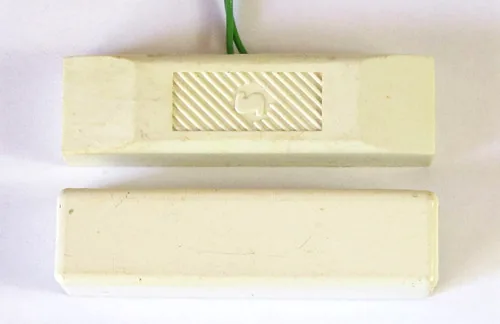
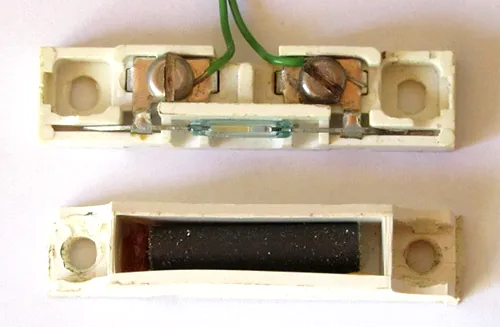
The reed switch alarm sensor is simply a reed switch packaged in a plastic case with an accompanying magnet packaged in a plastic case. The inside of the reed switch alarm sensor can be seen below.
How Does a Reed Switch Work?
A reed switch works through the interaction between a magnetic field and its internal metal contacts.
Inside the glass capsule are two thin metal strips called reeds. Their free ends are positioned close together, with a small gap between them in a normally open switch.
When a suitable magnetic field is applied, the reeds become magnetized. The resulting magnetic forces pull the contacts together, closing the circuit. When the magnetic field is removed, the reeds return to their original positions and the contacts open again.
The switching process can be divided into three stages:
- No magnetic field: The contacts of a normally open reed switch are separated, so the circuit is open.
- Magnetic field applied: The magnetic force brings the contacts together, allowing current to flow.
- Magnetic field removed: The contacts separate again, interrupting the current.
The switch responds to the strength, direction, and orientation of the magnetic field. Therefore, the distance at which it operates depends on the magnet, the switch design, and their relative positions.
A reed switch does not need a separate power supply to operate its contacts. However, the circuit connected to it may require a power source.
What Happens Inside a Magnetic Reed Switch?
The glass capsule of a magnetic reed switch is typically hermetically sealed. This means its internal environment is isolated from the surrounding atmosphere.
The metal reeds usually have specially treated contact surfaces to help provide reliable electrical switching. Their shape and magnetic properties allow them to act as both magnetic elements and electrical contacts.
When a magnetic field is applied, the reeds become magnetized in a way that causes their free ends to attract. Once the field becomes sufficiently strong, the contacts touch.
When the field weakens enough, the elastic properties of the reeds separate the contacts again.
This design combines two functions in one component:
- Magnetic field detection
- Electrical switching
There is no need for an electronic sensor circuit inside the switch itself. This makes a reed switch a relatively simple component compared with Hall-effect sensors, which use semiconductor electronics to detect magnetic fields.
Types of Reed Switches
Reed switches are available in several contact configurations. Choosing the correct type depends on whether you want a circuit to turn on when a magnet approaches, turn off when a magnet approaches, or change between two circuit paths.
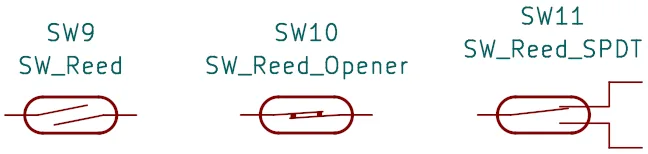
Schematic or circuit diagram symbols for three different reed switch contact arrangements are shown below. At the left of the below image are normally open switch contact, in the middle are normally closed contacts, and at the right are changeover contacts. Each is discussed in the sections that follow.
1. Normally Open Reed Switch
A normally open reed switch has contacts that are separated when no actuating magnetic field is present.
When a suitable magnet approaches, the contacts close and current can flow.
This is the most common type used in simple electronics projects. For example, you can connect a normally open switch to an LED circuit so that the LED lights when a magnet is brought close to the switch.
Typical applications include door sensors, proximity detection, and simple magnetic switching circuits.
2. Normally Closed Reed Switch
A normally closed reed switch has contacts that are touching when no actuating magnetic field is present.
When a suitable magnetic field is applied, the contacts open and interrupt the circuit.
This arrangement is useful when you want a circuit to be active under normal conditions and switch off when a magnet approaches.
The precise behavior depends on the switch’s magnetic design and the field applied. Always check the manufacturer’s specifications before selecting a normally closed device.
3. Changeover Reed Switch
A changeover reed switch contains a common contact and two alternative contact paths. As the switch operates, the common contact changes from one path to the other.
This configuration is useful when a magnetic field needs to select between two circuit states.
Changeover switches are less common than simple two-contact types and may have different internal constructions. Check the component’s datasheet to identify the common, normally closed, and normally open connections.
Reed Switch Contact Configurations Compared
The table below describes typical operating behavior of different switch contact configurations. The actual response depends on the specific component and the applied magnetic field.
| Type | No actuating magnetic field | Magnetic field applied |
|---|---|---|
| Normally open (NO) | Contacts open | Contacts close |
| Normally closed (NC) | Contacts closed | Contacts open |
| Changeover (CO) | Common connects to one contact | Common changes to the other contact |
Reed Switch Symbol and Circuit Diagram
In a schematic, a reed switch is represented by a switch contact symbol, sometimes accompanied by a magnetic-field indication or a label identifying it as magnetically operated.
The exact symbol may vary between schematic standards and software libraries. A clear component label, such as S1 (REED), helps identify the device.
When drawing a circuit, show the contact state in its unactuated condition unless the schematic standard or component documentation specifies otherwise.
For a normally open device, the contacts should be shown separated in the normal state. The contacts close when the switch is actuated by a suitable magnetic field.
A reed switch can be included in either the positive supply path or the ground return path of a low-voltage circuit, provided its electrical ratings are respected.
How to Connect a Reed Switch to an LED
One of the easiest ways to learn about magnetic switching is to build a circuit that lights an LED when a magnet approaches a switch.
Components Required
You will need:
- One normally open reed switch
- One LED
- One current-limiting resistor
- One low-voltage DC supply, such as a 5V source or 9V battery
- Connecting wires
- A breadboard, if desired
- A small permanent magnet
For a 5V supply, a 330Ω resistor is a reasonable starting point for many ordinary indicator LEDs. For a 9V battery, a 1k to 2k2 resistor is fine. Check the LED’s forward voltage and rated current to confirm that the resistor provides a suitable current.
Circuit Connections
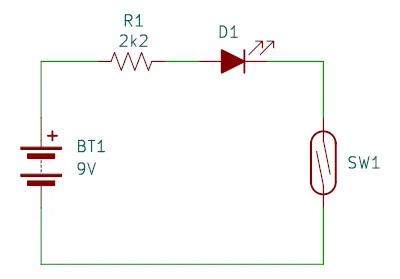
Connect the components in series as follows:
- Connect the positive terminal of the supply to one end of the resistor.
- Connect the other end of the resistor to the LED’s anode.
- Connect the LED’s cathode to one terminal of the normally open reed switch.
- Connect the other reed switch terminal to the negative terminal of the supply.
The resistor limits the current through the LED. The reed switch controls whether current can flow through the circuit. Below is a circuit diagram of the simple LED reed switch circuit.
How the Circuit Works
When the magnet is far enough away, the switch contacts remain open. No current flows through the LED, so it stays off.
Bring the magnet close to the switch. The contacts close, completing the circuit, and the LED lights.
Move the magnet away again. The contacts open, interrupting the current, and the LED turns off.
This experiment demonstrates how a reed switch can control an electrical load without requiring direct physical contact with the moving magnet.
Important: A reed switch is a mechanical contact device, not a current-limiting component. Always use an appropriate resistor with an LED and ensure that the switch’s voltage and current ratings are suitable for the circuit.
Magnet and Reed Switch: Choosing the Right Magnet
The performance of a magnet and reed switch combination depends on more than simply placing any magnet near the glass capsule.
The magnet must produce a suitable magnetic field at the switch’s contacts. The field strength, magnet orientation, distance, and switch sensitivity all influence whether the contacts operate.
Which Magnets Can Be Used?
Common choices include:
- Neodymium magnets: These small permanent magnets can produce a strong magnetic field, making them useful for compact sensing arrangements.
- Ferrite magnets: These are often less powerful for the same physical size but can work well when positioned close enough to the switch.
- Bar magnets: These are convenient for experiments because their poles and orientation can be explored easily.
A stronger magnet does not automatically guarantee better performance. A very strong field may cause unwanted operation, and the switching distance can vary with the switch design.
How Far Away Can a Magnet Operate a Reed Switch?
There is no single operating distance for all reed switches.
A small magnet may need to be positioned very close to the capsule, while a stronger magnet may operate a suitable switch from farther away. The distance also depends on the direction of the magnetic field relative to the internal reeds.
For a practical project, test the actual magnet and switch together. Move the magnet toward the switch slowly and note the distance at which the contacts close. Then move it away and note when they open.
The difference between these two distances is related to the switch’s operating and release characteristics.
For installations that require repeatable detection, consult the manufacturer’s sensitivity specifications and test the completed assembly under realistic conditions.
Reed Contact Switch: Electrical Ratings to Check
A reed contact switch has limits on the voltage and current it can safely handle. These ratings are important because the contacts are small and can be damaged by excessive current, voltage, or electrical arcing.
Before connecting a load, check the following specifications.
| Specification | What it Means |
|---|---|
| Maximum switching voltage | The maximum voltage allowed during switching |
| Maximum switching current | The maximum current the contacts can safely switch |
| Maximum carry current | The maximum current allowed while the contacts remain closed |
| Contact resistance | The resistance through the closed contacts |
| Operate sensitivity | The magnetic field level required to operate the switch |
| Release characteristics | The conditions under which the switch returns to its original state |
| Contact configuration | Whether the switch is normally open, normally closed, or changeover |
Do not assume that a switch can safely handle its maximum voltage and maximum current simultaneously. Some manufacturers specify a maximum switching power or additional limits for particular load types.
Why Inductive Loads Need Special Care
A small reed switch may work well with an LED or a low-current logic input but fail prematurely when used to switch a relay coil, motor, or solenoid.
Inductive loads can generate a voltage spike when the current is interrupted. This spike can cause arcing across the contacts, even when the normal operating current appears acceptable.
Depending on the circuit, a suitable suppression component, such as a flyback diode across a DC relay coil, can help reduce the voltage spike. The protection method must match the load and circuit requirements.
For larger loads, it is often better to use the switch as a control input for a transistor, MOSFET, or suitable driver rather than having the reed contacts carry the load current directly.
Reed Switch Circuit Ideas for Beginners
Once you understand the basic switching action, you can use the same component in several practical projects.
1. Magnetic Door or Window Detector
Mount the switch on a fixed frame and a magnet on the moving door or window. When the two move apart, the switch changes state. A simple circuit can use this change to activate an indicator or alarm.
2. Rotation Counter
Attach a small magnet to a rotating wheel and position the switch nearby. Each time the magnet passes, the switch changes state. A counter or microcontroller can use these events to count rotations or estimate rotational speed.
3. Liquid-Level Detector
A float containing a magnet can move along a guide as the liquid level changes. A reed switch positioned at a chosen level detects the magnet and changes state. The float and switch assembly must be designed for the liquid and operating environment.
4. Microcontroller Input
Connect a normally open switch between a digital input and ground. Configure the input with an internal pull-up resistor, if supported. The input reads HIGH while the switch is open and LOW when it closes to ground.
These projects illustrate the versatility of the component. For reliable results, account for switch contact bounce, magnetic sensitivity, mounting position, and the electrical characteristics of the connected circuit.
Using a Reed Switch with an Arduino
A reed switch can provide a simple digital input for an Arduino or another microcontroller.
One common arrangement uses the board’s internal pull-up resistor, eliminating the need for an external pull-up resistor in many basic projects.
Example Wiring
For a typical Arduino board:
- Connect one terminal of a normally open switch to digital pin 2.
- Connect the other terminal to GND.
- Configure pin 2 as
INPUT_PULLUP.
With this arrangement, the input reads HIGH while the switch is open and LOW when the contacts close.
Example Arduino Code
const int reedPin = 2;
const int ledPin = 13;

void setup() {
  pinMode(reedPin, INPUT_PULLUP);
  pinMode(ledPin, OUTPUT);
}

void loop() {
  int switchState = digitalRead(reedPin);

  if (switchState == LOW) {
    digitalWrite(ledPin, HIGH);
  } else {
    digitalWrite(ledPin, LOW);
  }
}When a magnet brings the contacts together, the Arduino detects a LOW input and turns on the LED connected to pin 13. When the magnet moves away and the contacts open, the LED turns off.
On many Arduino boards, pin 13 is associated with a built-in LED, but this depends on the board model.
What About Contact Bounce?
Because a reed switch has physical contacts, they can make and break contact several times in a short period when switching. This is known as contact bounce.
For a simple LED demonstration, contact bounce may not be noticeable. For a rotation counter or a circuit that counts every switching event, it can produce multiple readings from a single magnet pass.
Software switch debounce, appropriate filtering, or other signal-conditioning techniques can help prevent false counts.
For higher-speed applications, also check the maximum switching frequency and mechanical life specified for the switch.
Reed Switch vs. Hall-Effect Sensor
A reed switch and a Hall-effect sensor can both detect magnetic fields, but they operate differently.
| Feature | Reed Switch | Hall-effect Sensor |
|---|---|---|
| Operating principle | Magnetic force moves physical contacts | Semiconductor detects a magnetic field |
| Mechanical contacts | Yes | No |
| Power required by sensing element | No | Usually yes |
| Electrical output | Open or closed contacts, depending on type | Depends on sensor type and output circuit |
| Contact bounce | Possible | Not caused by mechanical contacts |
| Wear | Contacts can wear over time | No mechanical switching contacts |
| Typical uses | Door sensors, simple switches, position detection | Speed sensing, position sensing, electronic switching |
A reed switch is often a good choice when you want a simple, passive magnetic switch with minimal circuitry. A Hall-effect sensor may be more appropriate when the application requires high switching rates, electronic signal conditioning, or a particular output behavior.
Neither option is universally better. The best choice depends on the required switching speed, power consumption, environment, reliability, and circuit design.
Common Reed Switch Problems and Troubleshooting
If a circuit does not behave as expected, check the following possibilities.
The Switch Does Not Close
Possible causes include:
- The magnet is too far away.
- The magnet is oriented incorrectly.
- The magnet is not strong enough at the switch position.
- The switch is damaged.
- The circuit contains a wiring error.
Move the magnet slowly around the capsule and test different orientations. Do not bend the glass capsule or apply excessive mechanical force.
The Switch Does Not Open Again
Possible causes include an excessively strong or nearby magnetic field, another magnet or magnetic source influencing the switch, or a damaged contact mechanism.
Move the magnet farther away and check for other magnetic sources. If the contacts remain closed without an actuating field, test the component separately and replace it if necessary.
The LED Does Not Light
Check the power supply polarity, LED orientation, resistor connection, and wiring. Verify that the switch contacts close when the magnet approaches.
A multimeter set to continuity mode can help determine whether the switch changes state. Disconnect the component from any powered circuit before performing a continuity test.
The Circuit Produces Multiple Counts
If a microcontroller counts several events for one magnet pass, contact bounce may be responsible. Add suitable debounce logic and verify that the magnet is not causing repeated switching near the operating threshold.
Tips for Reed Switches
Use the following practical guidelines when selecting, installing, and testing a reed switch.
- Check the normal contact state. Confirm whether the switch is normally open or normally closed before designing the circuit.
- Test the magnet before installation. Different magnets produce different field strengths, so test the actual components together.
- Avoid bending the glass capsule. The glass is fragile, and mechanical stress can damage the switch or affect its operation.
- Observe the electrical ratings. Keep the voltage, current, and switching power within the manufacturer’s specified limits.
- Use a driver for larger loads. When switching a motor, relay, or other inductive load, consider using a transistor or MOSFET stage with appropriate protection.
- Consider the mounting position. The switch’s sensitivity depends on the magnet’s orientation and distance. Secure both parts so they remain correctly aligned.
- Account for contact bounce. Use software debounce or suitable signal conditioning when counting events or reading rapid changes.
- Keep stray magnetic fields in mind. Nearby magnets, magnetic components, and other sources of magnetic fields may cause unintended operation.
- Test the complete assembly. A switch that works on a workbench may behave differently after installation in an enclosure or near other components.
Following these practices can make magnetic sensing circuits more predictable and reliable.
Did You Know?
Reed switches have several interesting characteristics that make them useful in applications beyond simple LED circuits.
They Can Operate Without Electrical Power at the Switch
A conventional reed switch does not need a powered sensing element. The external magnetic field operates its contacts directly.
This makes it useful in passive sensing arrangements, although the circuit connected to the switch may still require power.
The Contacts Are Sealed Inside Glass
The sealed capsule protects the internal contacts from many environmental contaminants. This can be useful in applications where exposed contacts would be undesirable.
However, a sealed glass capsule does not make every reed switch waterproof, chemically resistant, or suitable for hazardous environments. The full assembly and its specifications determine its environmental suitability.
They Can Detect Movement Without Touching the Moving Part
A magnet can operate a reed switch across a small air gap. This is particularly useful for doors, rotating mechanisms, floats, and moving components where direct mechanical contact is inconvenient.
They Can Be Used to Measure Speed
If a magnet passes a reed switch once per rotation, each pass produces a switching event. A circuit can count these events to calculate rotational speed.
For example, if a wheel has one magnet and the switch registers 10 complete passes per second, the wheel is rotating at 10 revolutions per second, equivalent to 600 revolutions per minute.
If the wheel has multiple magnets, the number of switching events per revolution must be taken into account.
Reed Switches Have Mechanical Limits
Although the contacts are sealed, they still physically move. Switching life depends on the component, the electrical load, and the operating conditions. Excessive current or inductive switching can shorten contact life.
This is one reason reed switches should not be treated as unlimited-life electronic sensors.
Frequently Asked Questions About Reed Switch
What is a reed switch used for?
A reed switch is used to detect a magnetic field and control an electrical circuit. Common applications include door and window sensors, security alarms, position detectors, rotation counters, liquid-level sensors, and microcontroller inputs.
Does a reed switch need power?
No. The reed switch itself does not need an electrical supply to open or close its contacts. However, the circuit it controls usually needs power to operate an LED, alarm, microcontroller, or other load.
How does a magnet activate a reed switch?
The magnet produces a magnetic field that magnetizes the switch’s internal reeds. In a normally open design, the resulting magnetic attraction pulls the contacts together. When the field becomes sufficiently weak, the contacts separate again.
Can any magnet operate a reed switch?
Not necessarily. The magnet must provide a suitable magnetic field at the switch. A small or weak magnet may need to be placed very close to the capsule, while a stronger magnet may operate it from a greater distance. Orientation also affects operation.
Is a reed switch normally open or normally closed?
Both types are available. A normally open switch has separated contacts without an actuating magnetic field, while a normally closed switch has touching contacts. Changeover versions are also available.
Always check the specific component’s datasheet because the internal configuration determines its normal state.
How do you test a reed switch with a multimeter?
Disconnect the switch from any powered circuit and set the multimeter to continuity or resistance mode.
For a normally open switch, the meter should indicate an open circuit without an actuating magnetic field. Bring a suitable magnet close to the switch, and the meter should indicate continuity when the contacts close.
Remove the magnet and confirm that the contacts open again. If the switch does not respond, try changing the magnet’s position and orientation before concluding that the component is faulty.
Can a reed switch control an LED directly?
Yes, provided the LED circuit includes a suitable current-limiting resistor and the switch’s electrical ratings are respected. A low-current LED circuit is a common beginner experiment.
For larger loads, use an appropriate driver circuit rather than relying on the reed contacts to switch the load directly.
What is the difference between a reed switch and a magnetic sensor?
A reed switch is a type of magnetic sensor that detects a field through the movement of physical contacts. The broader term magnetic sensor also includes devices such as Hall-effect sensors and magnetoresistive sensors, which use electronic sensing elements instead of moving contacts.
Are reed switches suitable for Arduino projects?
Yes. A reed switch can be connected to a digital input and used to detect the presence or movement of a magnet. An Arduino can then respond by lighting an LED, counting rotations, recording events, or activating an alarm.
Use a suitable input configuration, such as INPUT_PULLUP, and implement debounce handling if repeated switching events would cause problems.
Conclusion
A reed switch is a simple but versatile electronic component that uses a magnetic field to open or close electrical contacts. Its sealed construction, passive operation, and straightforward connections make it useful in beginner electronics projects as well as practical sensing applications.
By understanding the different contact configurations, selecting a suitable magnet, checking electrical ratings, and allowing for contact bounce, you can use a reed switch reliably in circuits for door detection, position sensing, rotation counting, and microcontroller control.
Whether you are building a simple LED demonstration or designing a magnetic detection system, the reed switch provides an accessible way to introduce magnetic sensing into your electronics projects.