
The types of switches used in electronics vary according to how they operate, how many circuits they control, and how they connect electrical contacts. From a simple switch that turns an LED on and off to a push button that triggers a microcontroller input, switches are essential components in countless electronic circuits. Understanding the different types of switches helps you select the right component for your project, read circuit diagrams, and build reliable electronic devices.
What Are the Different Types of Switches?
The main types of switches used in electronics include single pole single throw (SPST), single pole double throw (SPDT), double pole single throw (DPST), double pole double throw (DPDT), push button, momentary, toggle, slide, rocker, and tactile switches.
Each switch has a particular contact arrangement or operating mechanism. Some switches maintain their position after being operated, while others return to their original position when released.
Here are the most common types of switches and their typical applications.
| Switch Type | Main Function | Common Application |
|---|---|---|
| Single pole single throw (SPST) | Turns one circuit on or off | Power switches and LED circuits |
| Single pole double throw (SPDT) | Connects one input to either of two outputs | Signal selection and changeover circuits |
| Double pole single throw (DPST) | Switches two circuits on or off together | Disconnecting two conductors |
| Double pole double throw (DPDT) | Switches two circuits between two sets of contacts | Motor direction control and polarity reversal |
| Push button switch | Operates when a button is pressed | Control panels and input circuits |
| Momentary switch | Changes contact state temporarily | Reset buttons and electronic controls |
| Toggle switch | Changes state using a lever | Equipment power and mode selection |
| Tactile switch | Provides a small, tactile button action | Keypads and circuit boards |
These categories are not all mutually exclusive. For example, a tactile switch is generally a type of momentary push button switch. Similarly, a toggle switch can have SPST, SPDT, or another contact arrangement.
To understand the types of switches properly, it helps to distinguish between their electrical contact arrangements and their physical operating mechanisms.
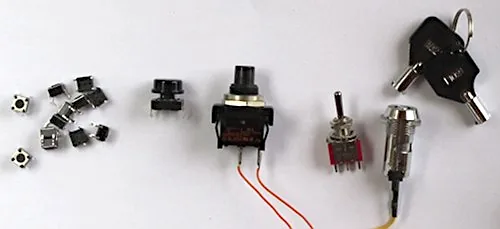
The following image shows examples of various types of switches used in electronics. From left to right: miniature tactile push-button switches, larger tactile push button switch with button attached, on-off push button switch, single pole double throw (SPDT) toggle switch, and a key switch with keys.
The following image shows the schematic symbols for two different types of switches used in circuit diagrams. On the left is the symbol for a single pole single throw switch. On the right is a normally open push button switch.

Understanding Switch Terminology
Before exploring individual types of switches, it is useful to understand two terms commonly found in electronic component specifications: pole and throw.
What Does Pole Mean in Switches?
A pole refers to an electrically independent circuit path controlled by a switch.
- Single pole: Controls one circuit path.
- Double pole: Controls two electrically separate circuit paths, usually with one operating mechanism.
For example, a double pole switch can control two separate circuits at the same time. The contacts may be mechanically linked, but the two electrical paths remain isolated from each other unless the circuit design connects them elsewhere.
What Does Throw Mean in Switches?
A throw describes the number of contact positions or output paths that a pole can select.
- Single throw: Each pole has one switched contact path.
- Double throw: Each pole can connect to one of two alternative contacts.
A single pole double throw switch, for example, has one common terminal that can connect to either of two other terminals.
The number of poles and throws describes the electrical contact arrangement, not necessarily the physical appearance of the switch. Two switches that look similar may have very different internal connections.
Types of Switches by Contact Arrangement
Switches are often classified using abbreviations such as SPST, SPDT, DPST, and DPDT. These abbreviations make it easier to understand circuit diagrams and select suitable components.
1. Single Pole Single Throw Switch (SPST Types of Switches)
A single pole single throw switch is one of the simplest types of switches. It controls one electrical path and has two main operating states: open and closed.
When the switch is closed, current can flow through the circuit if a suitable voltage is present and the rest of the circuit provides a complete path. When the switch is open, the path is interrupted.
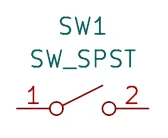
An SPST switch is commonly used to turn a circuit on or off. The following image shows the schematic or circuit diagram symbol for a SPST switch. Reference designators for switches in circuit diagrams are typically SW or S, for example SW1, SW2, etc., or S1, S2, and so forth.
Typical applications include:
- Switching an LED circuit on and off.
- Controlling power to a small electronic device.
- Enabling or disabling a circuit.
- Disconnecting a battery from a suitable low-voltage circuit.
For example, an SPST switch can be connected in series with a battery, a current-limiting resistor, and an LED. Closing the switch completes the circuit and illuminates the LED. Opening it interrupts the current. See the simplest circuit article which shows a circuit with a SPST switch in one of its circuit diagrams.
An SPST switch may be designed to stay in its selected position or operate momentarily, depending on its mechanism.
2. Single Pole Double Throw Switch (SPDT Types of Switches)
A single pole double throw switch has one common terminal and two alternative contact terminals. It connects the common terminal to one of the two contacts, depending on the switch position.
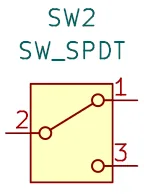
An SPDT switch is useful when a circuit needs to select between two alternative paths. The schematic symbol for a SPDT switch is shown below. This symbol shows that the common terminal labeled ‘2’ can connect between either contact 1, or contact 3, depending on the switch position.
Typical applications include:
- Selecting between two signal sources.
- Switching an indicator between two operating modes.
- Choosing between two low-voltage circuit paths.
- Implementing changeover functions in electronic projects.
For example, the common terminal could connect to a circuit input, while the two alternative terminals connect to different signal sources. Operating the switch selects which source is connected to the input. These types of switches can also be used in place of SPST switches by simply leaving one of the contacts unconnected.
Some SPDT switches are break-before-make, meaning the first contact disconnects before the second connects. Others may use a different contact sequence. Check the component datasheet if the switching sequence matters. An example of a manufacturer that manufactures various types of electronic switches is knitter-switch, where you can find datasheets for many different types of switches.
3. Double Pole Single Throw Switch (DPST Types of Switches)
A double pole single throw switch controls two separate circuit paths using one operating mechanism. Each pole has one switched contact path.
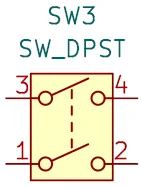
A DPST switch commonly has four main terminals, with two terminals associated with each pole. When operated, both paths change state together. The image below shows the schematic symbol for a DPST switch type. When the switch is open, none of the circuit paths are connected. When the switch is closed, switch pin 3 connects to pin 4. In addition, pin 1 connects to pin 2 of the switch.
Typical applications include:
- Switching two circuit paths simultaneously.
- Disconnecting two conductors in an appropriately designed circuit.
- Controlling two sections of a low-voltage electronic system.
- Switching two loads together when their electrical ratings and circuit requirements permit it.
A DPST switch is different from an SPST switch because it operates two poles rather than one. However, a double pole switch should not automatically be assumed to provide safe isolation for every application. The voltage rating, current rating, contact spacing, and applicable electrical safety requirements must all be considered.
4. Double Pole Double Throw Switch (DPDT Type of Switches)
A double pole double throw switch controls two independent circuit paths, with each pole able to connect to one of two alternative contacts.
A typical DPDT switch has six terminals: two common terminals and four alternative contact terminals. The two poles operate together mechanically, making this switch useful when two connections must change between alternative arrangements. The following image shows the schematic symbol of a DPDT switch.
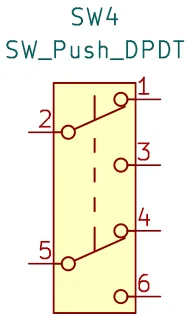
Typical applications include:
- Reversing the polarity supplied to a suitable DC motor.
- Switching between two circuit configurations.
- Selecting between two pairs of signal paths.
- Changing the connections of a low-voltage electronic circuit.
For example, a DPDT switch can be wired to reverse the polarity applied to a brushed DC motor. Reversing the motor’s supply polarity reverses its direction of rotation, assuming the motor and connected circuitry are suitable for this operation.
A DPDT switch is not inherently a motor reversing switch. The reversing function depends on how its terminals are connected.
When wiring a DPDT switch, always check the manufacturer’s terminal diagram. The physical arrangement of the terminals can differ between models.
Types of Switches by Operating Mechanism
The contact arrangement explains what a switch does electrically. The operating mechanism explains how a person or another mechanism activates it.
The following types of switches are commonly identified by their physical operation.
5. Push Button Switch
A push button switch is operated by pressing a button. Depending on its design, the switch may maintain its state after being pressed or return to its original state when released. Push button switches are available with different contact arrangements, current ratings, mounting styles, and actuator sizes.
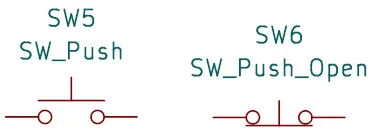
The image below shows two types of push button switch schematic symbols. At the left of the image is a normally open momentary push button switch. When the button is pressed, the switch closes. When the button is released, the switch automatically opens again. At the right is a normally closed momentary push button switch. When the button is pressed on this type of switch, it opens. When the button is released, it automatically closes again. These are just two examples of non-latching push button switches.
Common applications include:
- Starting or stopping equipment.
- Activating an electronic circuit.
- Triggering a digital input.
- Resetting a microcontroller.
- Operating control panels and user interfaces.
- See the Arduino tone project for an example of a normally open momentary push button switch circuit.
A push button switch may have normally open (NO) or normally closed (NC) contacts. The above symbols show momentary push button switches with NO contacts at the left and NC contacts at the right.
A normally open contact is open in its normal, unactuated state and closes when operated. A normally closed contact is closed in its normal state and opens when operated. These terms describe the contact state under the specified normal conditions, not necessarily the state of the entire electronic circuit.
How a Push Button Switch Works
Consider a push button connected to a microcontroller input.
When the button is pressed, the electrical connection changes, allowing the input voltage to change. The microcontroller can detect this change and respond by turning on an LED, starting a timer, or performing another programmed action.
The input must have a defined logic level when the button is not pressed. A pull-up or pull-down resistor is commonly used for this purpose, unless the circuit uses an appropriate internal pull-up or pull-down. The Arduino tone project uses an internal pull-up resistor with a push button switch.
6. Momentary Types of Switches
A momentary switch changes its contact state only while it is being actuated. When the operating force is removed, the switch normally returns to its original state. This makes a momentary switch useful for sending a brief command rather than maintaining a continuous on or off state.
The precious section shows the symbols for two momentary push button switches, that are repeated below. These switches are both momentary, and push button types of switches.
There are two common momentary contact arrangements:
- Normally open momentary switch: The contact closes while the switch is pressed and opens when released.
- Normally closed momentary switch: The contact opens while the switch is pressed and closes when released.
The most familiar example is a doorbell button. Pressing it activates the doorbell circuit, and releasing it stops the activation. Other applications include reset buttons, keyboard keys, electronic control inputs, and test buttons.
A momentary switch is often used with a microcontroller because it provides a simple way for a user to generate an input event. However, the mechanical contacts may bounce briefly when they open or close. This can produce multiple rapid transitions instead of one clean transition. Hardware or software switch debouncing is often used when a circuit must detect a single press reliably.
7. Momentary Push Button Switch
A momentary push button switch combines a push button operating mechanism with momentary action. It is pressed to change the contact state and released to allow the switch to return to its normal state. This is one of the most common switch types in electronic projects. It is a combination of the push button switch type, and momentary switch type, as discussed in the previous two sections.
For example, a normally open momentary push button switch can be connected between a microcontroller input and ground. With an appropriate pull-up resistor, the input is normally high and becomes low when the button is pressed. The software can detect the transition and respond to the press.
Typical uses include:
- Reset and boot buttons, for example on the Arduino platform boards.
- Electronic project controls.
- Menu selection buttons.
- Calculator and keypad inputs.
- Test and measurement equipment.
The terms push button switch and momentary switch are related but not interchangeable in every context. A push button describes how the switch is operated, while momentary describes how its state behaves. A push button may be momentary or latching, depending on its design.
8. Tactile Switch
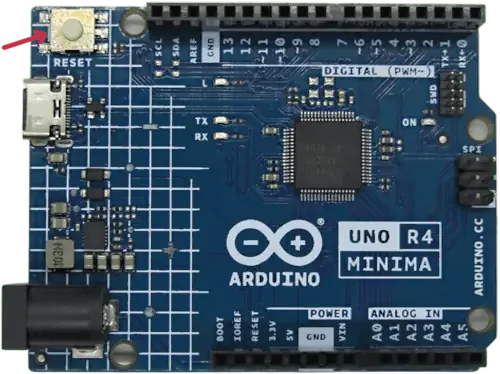
A tactile switch, often called a tactile push button or tact switch, is a small momentary switch commonly mounted directly on a printed circuit board (PCB), for example the reset button on many Arduino platform boards.
Many tactile switches provide a noticeable physical click when pressed. This feedback helps the user recognize that the button has been actuated.
Tactile switches are especially common in compact electronic devices because they require relatively little space.
Typical applications include:
- Microcontroller development boards.
- Reset and boot controls.
- Keypads and small control panels.
- Consumer electronics.
- Menu navigation and configuration buttons.
The following image shows the tactile momentary push button switch used as a reset button on an Arduino Uno R4 MINIMA board. The red arrow at the top left of the image indicates the tactile switch. Note that the switch is marked with the text RESET below it.
Many common tactile switches have four physical pins, but these do not necessarily represent four independent electrical connections. Typically, two pins on one side are internally connected, and the two pins on the other side form the other contact connection. Pressing the button connects the two sides.
Always check the switch datasheet or test the terminals with a multimeter before designing the circuit.
A tactile switch is generally a momentary switch, but its physical construction and tactile feedback distinguish it from many other push button designs.
Other Common Types of Switches Used in Electronics
The electrical contact arrangement is only one way to classify switches. Several other physical designs are widely used in electronic equipment.
Toggle Switch
A toggle switch uses a small lever that moves between positions. Many toggle switches maintain their selected position until the lever is moved again.
Toggle switches are available with different pole and throw configurations, including SPST, SPDT, DPST, and DPDT designs.
They are often used for power control, mode selection, and changing the configuration of electronic equipment.
When choosing a toggle switch, check its electrical ratings and whether it is maintained or momentary. Some toggle switches return automatically to a normal position when released.
Slide Switch
A slide switch changes its contact state when a small slider is moved from one position to another. Slide switches are common in battery-powered devices, small electronic instruments, and circuit boards. They are often used to select between two operating modes or switch low-power circuits on and off.
Some slide switches have two positions, while others have three or more. The number of positions and electrical contacts should be confirmed from the manufacturer’s specifications.
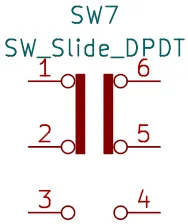
The image below shows one example of a slide switch schematic symbol. It is an example of a double pole double throw (DPDT) slide switch. In one position it joins pin 1 to 2, and pin 6 to 5. When it is switched to the other position by sliding the lever or knob, it connects pin 3 to pin 2, and pin 4 to pin 5.
Rocker Switch
A rocker switch operates when one side of its actuator is pressed down and the opposite side moves upward.
Many rocker switches maintain their selected position and are used for power control in electronic equipment.
Some models include illuminated indicators, allowing the user to see whether the switch is on.
Rocker switches are available in a range of contact configurations and electrical ratings. Their physical shape alone does not indicate whether they are suitable for a particular voltage or current.
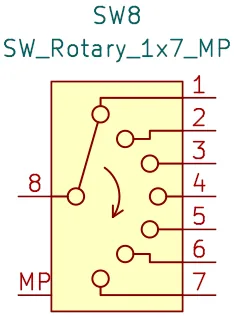
Rotary Switch
A rotary switch uses a rotating shaft or knob to select among multiple contact positions. Rotary switches are useful when a circuit needs more than two operating choices.
Applications include selecting measurement ranges, choosing operating modes, and switching between multiple signal paths.
Some rotary switches use several poles, allowing more than one circuit path to change as the knob is rotated. The number of positions, pole arrangement, and contact sequence depend on the model.
The following image shows an example of a rotary switch schematic symbol that has 7 positions. Pin 8 on the symbol is the common pole that can be switched to one of 7 different contacts by rotating the switch’s shaft.
Reed Switch
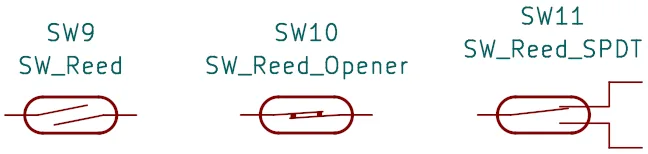
A reed switch is an electrically operated contact device that responds to a magnetic field. Its contacts are enclosed in a sealed glass capsule in many common designs.
When a suitable magnetic field is applied, the contacts change state. The exact behavior depends on whether the device is normally open, normally closed, or a specialized type.
Reed switches are often used in magnetic door sensors, position detection, and other applications where a moving magnet can operate a contact without direct mechanical contact.
For example, a magnet attached to a door can activate a reed switch mounted on the door frame, allowing an electronic circuit to detect whether the door is open or closed.
The following image shows they schematic symbols for various types of reed switches. At the left is a normally open reed switch, in the middle is a normally closed reed switch, and at the right is a SPDT (single pole double throw) reed switch.
Limit Switch
A limit switch is operated by physical movement or contact with a moving object. It is commonly used to detect when a mechanism reaches a particular position. Limit switches may use a lever, roller, plunger, or another actuator.
Typical applications include detecting the end of travel of a motorized mechanism, monitoring a machine guard, and identifying the position of a moving assembly.
A limit switch is not necessarily a power switch. In many electronic systems, it simply changes the state of a low-voltage input that tells a controller what has happened.
Comparing the Main Types of Switches
The following table summarizes the differences between the most important switch types for beginners.
| Switch Type | Contact Arrangement or Action | Maintains State? | Best Suited To |
|---|---|---|---|
| SPST | One pole, one switched path | Often, but not always | Simple on/off control |
| SPDT | One pole, two alternative paths | Often, but not always | Selecting between two connections |
| DPST | Two poles, one switched path per pole | Often, but not always | Switching two circuit paths |
| DPDT | Two poles, two alternative paths per pole | Often, but not always | Changing two circuit connections |
| Push button | Press-operated | Depends on design | User controls |
| Momentary switch | Temporary change while actuated | No, under normal operation | Pulses, resets, and control inputs |
| Tactile switch | Small push button with tactile feedback | Usually no | PCB-mounted user inputs |
| Toggle switch | Lever-operated | Often | Power and mode selection |
| Slide switch | Slider-operated | Often | Compact on/off or mode controls |
| Rocker switch | Rocking actuator | Often | Panel-mounted power control |
| Rotary switch | Rotating selector | Often | Selecting among multiple settings |
| Reed switch | Magnetically operated contacts | Depends on magnetic field and design | Magnetic sensing |
| Limit switch | Mechanically actuated contacts | Depends on actuator position | Position and travel detection |
The table highlights an important distinction: a switch’s electrical contact arrangement and its operating mechanism are separate characteristics. A toggle switch can be SPDT, for example, and a tactile switch can be described as a momentary push button switch.
Normally Open vs. Normally Closed Types of Switches
Another important distinction is whether a switch is normally open or normally closed.
Normally Open (NO)
A normally open switch has contacts that are open in their normal, unactuated state.
For a typical normally open momentary button:
- The button is released, and the contacts are open.
- The button is pressed, and the contacts close.
- The button is released, and the contacts open again.
This arrangement is common in doorbell buttons, reset controls, and digital input circuits.
Normally Closed (NC)
A normally closed switch has contacts that are closed in their normal, unactuated state.
For a typical normally closed momentary button:
- The button is released, and the contacts are closed.
- The button is pressed, and the contacts open.
- The button is released, and the contacts close again.
Normally closed contacts are useful in some sensing, control, and monitoring applications because an open circuit can indicate either an intentional actuation or a wiring fault, depending on the circuit design.
The meaning of “normal” should always be checked against the component documentation. It generally refers to the state when the actuator is not operated.
How to Choose the Right Type of Switch
Choosing between the types of switches available depends on what the circuit needs to do, how the switch will be operated, and the electrical conditions in which it will work.
1. Decide What the Switch Must Do
Start by defining the required function.
- Choose an SPST switch for straightforward on/off control.
- Choose an SPDT switch to select between two connections.
- Choose a DPST switch to switch two circuit paths together.
- Choose a DPDT switch when two circuit paths must change between alternative connections.
- Choose a momentary push button switch when the circuit needs a temporary user input.
- Choose a tactile switch when space is limited and a small PCB-mounted button is suitable.
These are starting points rather than absolute rules. The exact circuit and operating requirements determine the final choice.
2. Check the Voltage and Current Ratings
A switch must be rated for the electrical load it controls.
Check the manufacturer’s specifications for:
- Maximum rated voltage.
- Maximum rated current.
- AC or DC rating, as applicable.
- Resistive or inductive load rating.
- Electrical and mechanical life.
A switch rated for a particular AC voltage and current cannot automatically be assumed to handle the same voltage and current on DC. DC switching can be more demanding because the current does not naturally pass through zero as it does in an AC circuit.
Motors, relays, lamps, and other inductive or inrush-current loads may also impose conditions that differ from those of a simple resistive load.
3. Consider the Operating Mechanism
The physical design should match how the user or system will operate the switch.
For example, a toggle switch is useful for a control that must remain in a selected position. A tactile switch is more appropriate for a small reset button on a circuit board.
A momentary button is usually a better choice for a microcontroller input that responds to a press than a maintained switch, although either can be used if the circuit and software are designed accordingly.
4. Check the Number of Terminals
The number of terminals can help identify a switch, but it is not a reliable substitute for checking its datasheet.
Common examples include:
- SPST switches with two main terminals.
- SPDT switches with three main terminals.
- DPST switches with four main terminals.
- DPDT switches with six main terminals.
Physical packages may have extra terminals for illumination, grounding, mechanical support, or duplicate connections. Some switches also use unusual terminal layouts.
Use the manufacturer’s terminal diagram to confirm the connections before wiring the circuit.
5. Consider the Environment
The operating environment can affect switch reliability and safety.
Check whether the switch needs protection against dust, moisture, vibration, accidental activation, or frequent operation. For equipment exposed to harsh conditions, the specified ingress protection rating and mechanical life may be important.
A switch used in a classroom breadboard project has different environmental requirements from one installed in outdoor equipment or industrial machinery.
Wiring Different Types of Switches in Simple Electronic Circuits
Understanding how switches connect to a circuit makes it easier to use them in practical projects.
Using an SPST Switch to Control an LED
A simple LED circuit can use a battery or suitable DC power supply, a current-limiting resistor, an LED, and an SPST switch. The switch is connected in series with the other components. Closing it completes the circuit, allowing current to flow. Opening it interrupts the current.
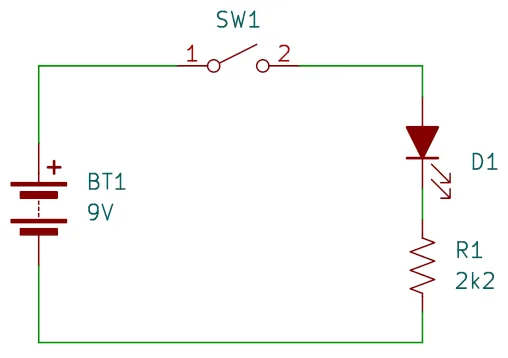
The resistor limits LED current and must be selected for the supply voltage, LED forward voltage, and desired current.
This is a useful beginner experiment because it demonstrates the difference between an open circuit and a closed circuit.
Using a Momentary Switch with a Microcontroller
A momentary push button switch can provide an input to a microcontroller such as an Arduino.
A common arrangement uses a normally open button between a digital input pin and ground, with the microcontroller’s internal pull-up resistor enabled.
In this arrangement:
- When the button is released, the input is normally high.
- When the button is pressed, the input is connected to ground and becomes low.
The program can detect this change and use it to control an LED, advance through a menu, or activate another function.
Because mechanical contacts can bounce, software debouncing may be needed to prevent one press from being interpreted as several rapid presses.
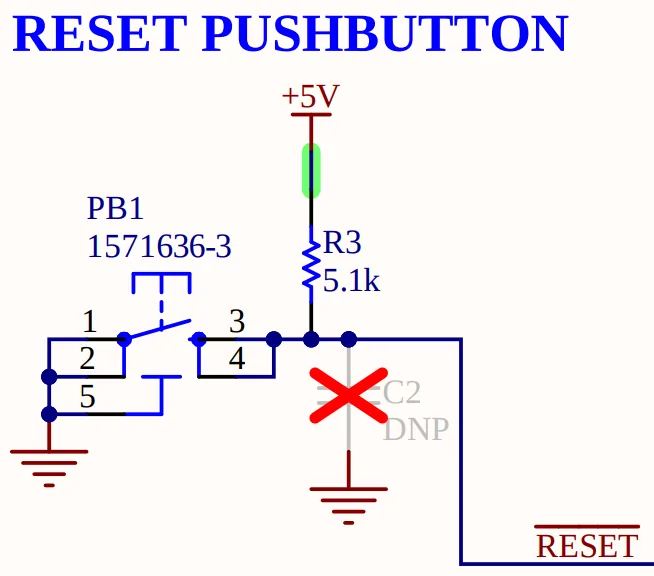
Another example of a momentary switch is the reset button connected to a microcontroller. For example, the reset button connected to the microcontroller reset pin on an Arduino Uno R4 MINIMA board. The image below shows the momentary push button switch used as a reset button from the Arduino Uno R4 MINIMA schematic diagram. Note that this circuit diagram uses a different type of push button switch symbol to the ones shown earlier in this article.
Using a DPDT Switch to Reverse a DC Motor
A DPDT switch can be wired to reverse the supply polarity applied to a suitable brushed DC motor.
The motor terminals connect to the switch’s common terminals, while the supply connections are arranged so that moving the switch reverses the polarity across the motor. This changes the direction of rotation for a typical brushed DC motor.
Before building this circuit, check the motor’s current requirements and the switch’s DC rating. A motor may draw a much larger current when starting or stalled than it draws while running freely. The switch must also be suitable for the motor’s switching conditions. Do not assume that a DPDT switch can safely reverse every motor or load.
Tips for Selecting Different Types of Switches
The following practical tips will help you select, test, and use switches more reliably in electronic projects.
- Identify the contact arrangement first. Determine whether you need SPST, SPDT, DPST, or DPDT contacts before selecting the physical switch.
- Read the datasheet. Confirm the terminal arrangement, voltage and current ratings, operating mechanism, and contact sequence.
- Use a multimeter to test unfamiliar switches. The continuity test function can help identify which terminals connect in each position. Disconnect power before testing.
- Check whether a button is momentary or latching. A momentary switch returns to its normal state when released, while a latching design maintains its state. Pushing a latched type again will unlatch it.
- Do not confuse physical pins with electrical contacts. Some tactile switches have four pins but only two electrically distinct contact groups.
- Account for contact bounce. Add hardware or software switch debouncing when a digital circuit needs reliable detection of individual button presses.
- Use suitable pull-up or pull-down resistors. A digital input should not be left floating when a switch is open unless the circuit has another method of defining its logic level.
- Check DC switching ratings carefully. A switch’s AC rating does not necessarily indicate its suitability for a DC load.
- Consider the load’s startup current. Motors, lamps, and capacitive loads can draw more current during startup than during normal operation.
- Disconnect power before changing wiring. This reduces the risk of short circuits, component damage, and accidental contact with energized conductors.
For beginner electronics experiments, start with low-voltage DC circuits and components with clearly documented ratings. Mains-voltage switching requires appropriately rated components, suitable insulation, and compliance with relevant electrical safety requirements.
Did You Know? Interesting Facts About Types of Switches
Switches have several interesting characteristics that are not always obvious when looking at their external appearance.
One Switch Can Have Several Classifications
A single component can be described by both its contact arrangement and its operating mechanism. For example, a maintained SPDT toggle switch is a single pole double throw switch operated by a lever that stays in its selected position.
A small normally open tactile button, on the other hand, is generally a momentary push button switch.
These descriptions provide more useful information than the physical appearance alone.
A Four-Pin Tactile Switch Often Has Only Two Electrical Contacts
Many common four-pin tactile switches use two pairs of internally connected pins. Pressing the button joins the two electrical sides.
This is why connecting all four pins as if they were independent terminals can lead to wiring mistakes. Testing the pins with a multimeter or checking the datasheet helps reveal the internal arrangement.
Switches Can Detect More Than Human Input
Not every switch is operated by a person. A reed switch can respond to a magnetic field, while a limit switch can detect the position of a moving part.
These devices allow an electronic circuit to respond to its surroundings without requiring a person to press a button.
Contact Ratings Depend on the Load
A switch that works well in a low-current LED circuit may not be suitable for a motor. The motor’s startup current, inductive behavior, and switching frequency can all affect the demands placed on the contacts.
Selecting a switch by its current rating alone, without considering the type of load, can lead to premature contact wear or failure.
Frequently Asked Questions About Types of Switches
What Are the Most Common Types of Switches in Electronics?
Common types include SPST, SPDT, DPST, DPDT, push button, momentary, toggle, slide, rocker, rotary, tactile, reed, and limit switches. They differ in their contact arrangements, operating mechanisms, and intended applications.
What Is the Difference Between an SPST and an SPDT Switch?
An SPST switch controls one circuit path, typically opening or closing it. An SPDT switch has one common terminal and can connect it to either of two alternative contacts. An SPST switch is commonly used for on/off control, while an SPDT switch is useful for selecting between two different connections.
What Is a Single Pole Switch Used For?
A single pole switch controls one electrical circuit path. Depending on its contact arrangement, it can turn a circuit on or off or select between two alternative connections. An SPST switch is a common example used in basic LED and power-control circuits.
What Is a Double Pole Switch?
A double pole switch controls two electrically separate circuit paths using one operating mechanism. A DPST switch switches both paths on or off, while a DPDT switch allows each path to change between two alternative contacts.
What Is a Double Pole Double Throw Switch Used For?
A double pole double throw switch is used when two circuit paths must switch between alternative connections. One common application is reversing the polarity supplied to a suitable brushed DC motor. It can also select between different circuit configurations.
What Is the Difference Between a Push Button Switch and a Momentary Switch?
A push button switch describes a switch operated by pressing a button. A momentary switch describes a switch that changes state temporarily while actuated and returns to its normal state when released. Many push button switches are momentary, but some push buttons use latching mechanisms.
What Is a Tactile Switch Used For?
A tactile switch is a small, usually PCB-mounted push button that provides tactile feedback when pressed. It is commonly used for reset buttons, menu controls, keypad inputs, and user interfaces in electronic devices.
How Can I Identify the Terminals on an Unknown Switch?
Disconnect the switch from any powered circuit and use a multimeter’s continuity function to test the terminals in each switch position. Record which terminals connect when the switch is operated. If available, consult the manufacturer’s datasheet to confirm the terminal layout and contact arrangement.
Can I Use Any Switch to Control an LED or Motor?
No. The switch must have a suitable electrical rating for the supply voltage, current, and type of load. A low-current tactile switch may be suitable for a microcontroller input but unsuitable for switching a motor directly. For motors, check startup current and the switch’s DC and inductive-load ratings.
Final Thoughts on Types of Switches
Understanding the different types of switches is an important part of learning electronics. SPST switches provide simple on/off control, SPDT switches select between two connections, and DPST and DPDT switches control two circuit paths. Push button, momentary, and tactile switches provide convenient ways to interact with electronic circuits, while toggle, slide, rocker, rotary, reed, and limit switches serve a wider range of control and sensing applications.
When choosing between different types of switches, consider the required contact arrangement, operating mechanism, voltage and current ratings, load characteristics, and installation environment. By learning these differences and checking the manufacturer’s specifications, you can select suitable switches, interpret circuit diagrams more confidently, and build safer, more reliable electronic projects.